Simplifi Studio

Features

One connected system for the work behind your business

Running a service business means keeping many moving pieces aligned. New inquiries need attention. Bookings need to be scheduled. Teams need clear assignments. Clients need updates. Payments need to be tracked.

Simplifi Studio is built as a connected operations platform for service businesses: from the first customer inquiry, to the quote, the booking, the work itself, the payment, and the report that tells you how it all went.

Instead of separate tools for each stage, everything moves through one system — so information doesn't have to be re-typed, re-explained, or re-remembered every time work changes hands.

One record · one workflow

Live

Nothing is re-entered between these steps.

Connected operations

A business has a lot of moving parts. They shouldn't move separately.

As your business grows, there is more to keep track of at every stage. Inquiries turn into quotes. Quotes turn into bookings. Bookings need schedules, assignments, tasks, payments, client updates, and follow-ups.

Meanwhile, recurring work still needs to happen and the business still needs a clear view of what is going on. That is where service business operations can become difficult to manage — information ends up scattered across conversations, spreadsheets, calendars, accounting tools, and individual people's memories.

Simplifi integrates these activities into a service business workflow, so the information stays consistent as the work progresses.

The result is a clearer way to manage day-to-day operations and to see how each part of the business affects the next.

See how Simplifi works →

The same eleven activities

Inquiries Quotes Bookings Scheduling Team assignments Service delivery Client communication Payments Business reporting Follow-ups Repetitive tasks Chat · Spreadsheets · Calendars · Notebooks · Memory Inquiries Quotes Bookings Scheduling Team work Follow-ups Delivery Client updates Payments Reporting Recurring work One workflow context moves with the work

Feature categories

Find the tools that support every part of your operation

Every service business has its own way of working, but the operational questions are often similar. How do you bring in more bookings? How do you keep inquiries organized? How do you know what is happening with every job? Where does the money stand? What can be automated?

Explore Simplifi by the part of the operation you want to improve.

Bring in business

Get More Bookings Online

01

Give customers a clearer path from discovering your services to choosing what they need and completing a booking.

Public Booking Website Services and Pricing Packages Booking Wizard Online Availability +3 more
Turn Inquiries Into Organized Sales

02

Keep your potential customers, quotes, follow-ups, and sales opportunities organized from the first inquiry through the decision to book.

Leads Lead Statuses Lead Sources Quotes Quote Approval +6 more

Preview · Get More Bookings Online

yourstudio.simplifi.studio/book

Step 2 of 4 · Choose a package

Add extras

Booking total
Promo codes and availability are checked here.

Try it — the booking total updates as a customer chooses.

Preview · Turn Inquiries Into Organized Sales

Leads

18 open

Click a stage — every inquiry keeps its source and history.

Deliver the work

Keep Bookings and Service Delivery on Track

03

Keep bookings, schedules, tasks, projects, deliverables, and fulfillment connected from confirmation through completion.

Bookings Booking Statuses Production Calendar Projects and Tasks Task Dependencies +6 more

Preview · Keep Bookings and Service Delivery on Track

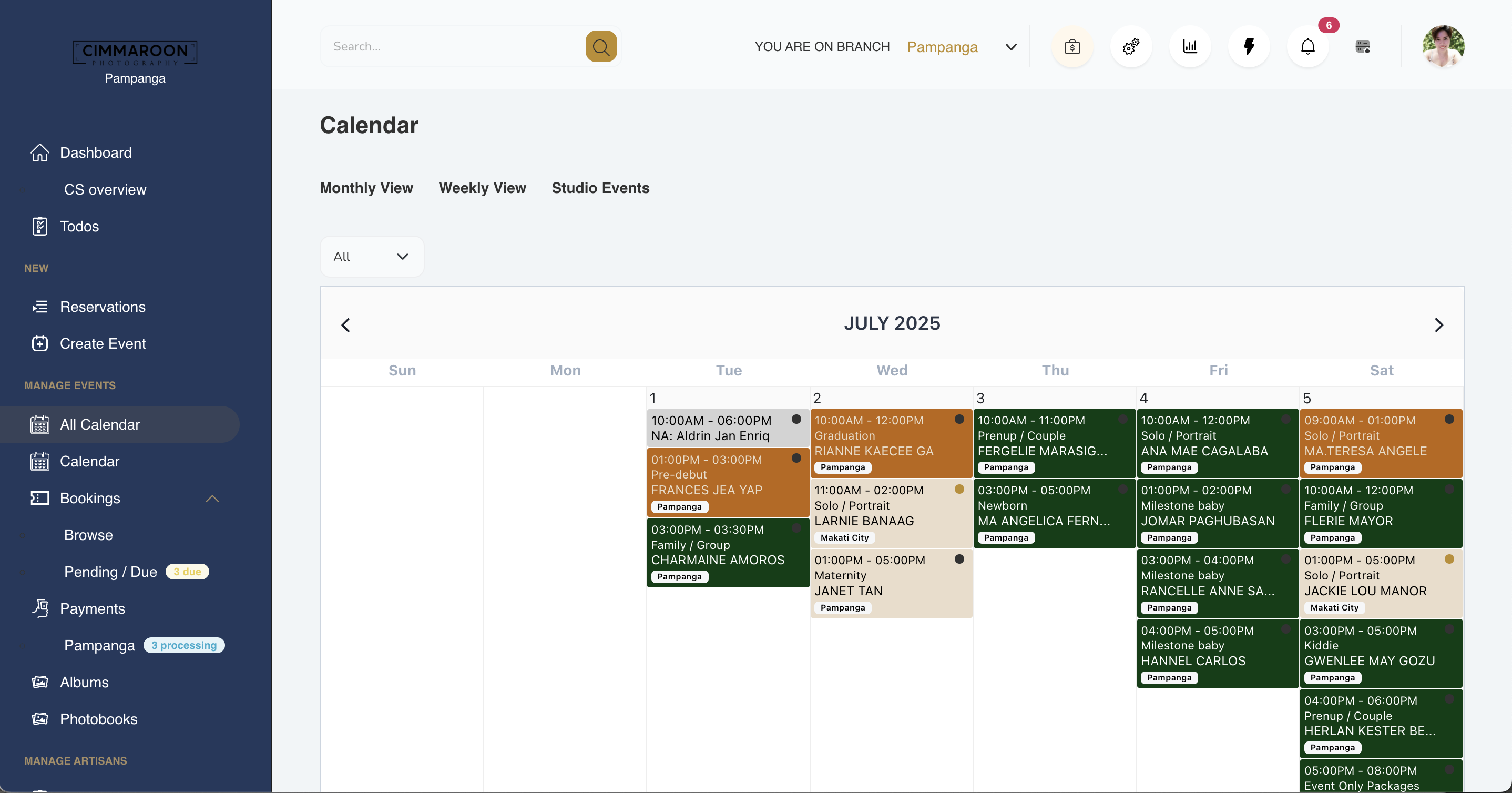
Production Calendar
Every confirmed booking lands on the calendar with its service, branch and assigned crew.
Simplifi Studio production calendar showing a month of bookings colour-coded by branch and service, enlarged

Coordinate Your Team and Work

04

Give your team members clear assignments, schedules, deadlines, and responsibilities, and improve visibility into their work.

Team Activities Work Dashboard Work Calendar My Work Permissions +6 more

Keep Clients Informed

05

Give clients access to booking, payment, invoice, receipt, policy, and delivery information without repeated manual updates.

Client Booking Portal Booking Status Payment Summary Invoices Client Galleries +6 more

Preview · Coordinate Your Team and Work

JA Jun A. · PhotographerPrenup shoot · Sat 14 Jun · 2pm On track
AM Amy M. · Editor40 photos to edit · due Wed Due in 2 days
MT Mitch T. · CoordinatorAlbum layout approval Overdue

One view of who is doing what, without asking for an update.

Amy sees only her own assignments — permissions decide the rest.
TUE Edit 40 photos · Booking 2026-0114Deadline Wed 5pm
THU Album layout · Booking 2026-0109Waiting on client selection Blocked
FRI Payout review · MayPHP 12,400 across 6 jobs Ready

Switch the view — the same work, seen by role.

Preview · Keep Clients Informed

Client Booking Portal
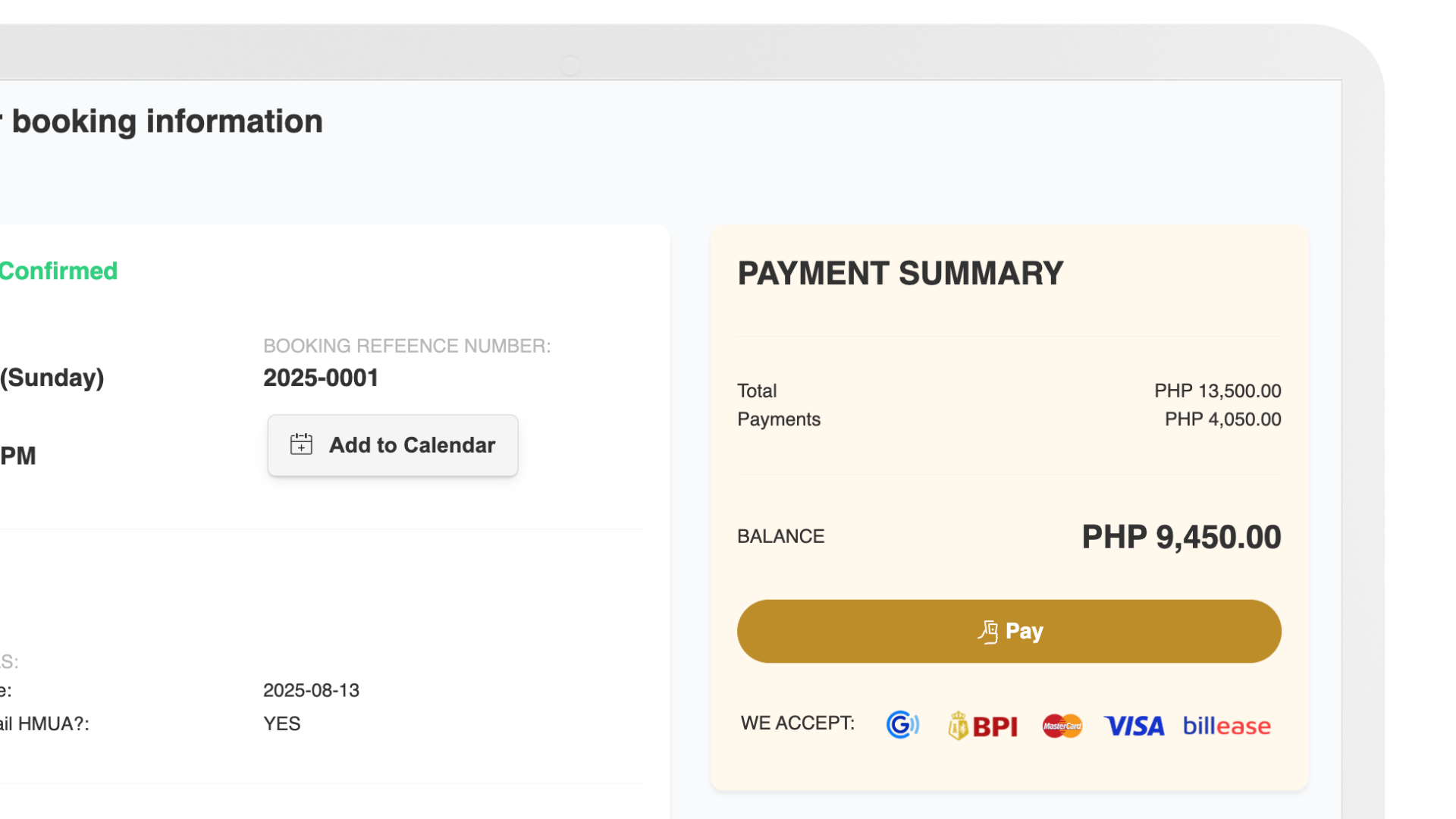
Booking status, balance, receipts and delivered work — answered before the client has to ask.
A client viewing their booking status, payment summary and outstanding balance in the client portal, enlarged

Stay in control

Keep Payments and Finances Under Control

06

Keep customer payments, expenses, budgets, approvals, and financial records connected to the work or project they belong to.

Payment Manager Payment Reconciliation Expense Manager Budget Management Finance Dashboard +9 more

Automate Repetitive Operations

07

Reduce reminders, notifications, follow-ups, and recurring actions that depend on someone remembering to trigger them.

Automation Library My Automations Booking Automations Payment Automations Client Journey Automations +5 more

Preview · Keep Payments and Finances Under Control

Finance

Collected

PHP 335,000

Outstanding

PHP 74,150

Unreconciled

3

Spent

PHP 118,400

Budget left

PHP 41,600

For approval

2

Booking 2026-0114 · DepositGCash · matched to sales orderPHP 4,050Reconciled
Booking 2026-0114 · BalanceDue 3 days before the shootPHP 9,450Reminder set
Booking 2026-0109 · Full paymentBank transfer · receipt uploadedPHP 18,000To verify
Requisition · Printing suppliesRequested by Mitch T.PHP 6,200For approval
Vendor · Album supplierPurchase order 2026-0042PHP 22,800Paid
Recurring · Studio rentPosts on the 1st, every monthPHP 35,000Scheduled

Every amount stays attached to the booking or project it belongs to.

Switch between money in and money out.

Preview · Automate Repetitive Operations

Automation Library

Presets cover bookings, payments, client journey, team, finance and marketing.

Toggle one on — that is one less thing to remember.

Improve the business

Turn Business Activity Into Better Decisions

08

See what is happening across sales, bookings, revenue, finances, operations, and marketing so daily activity can inform better decisions.

Sales Dashboard Booking Performance Revenue Performance Finance Dashboard Operations Dashboard +8 more

Preview · Turn Business Activity Into Better Decisions

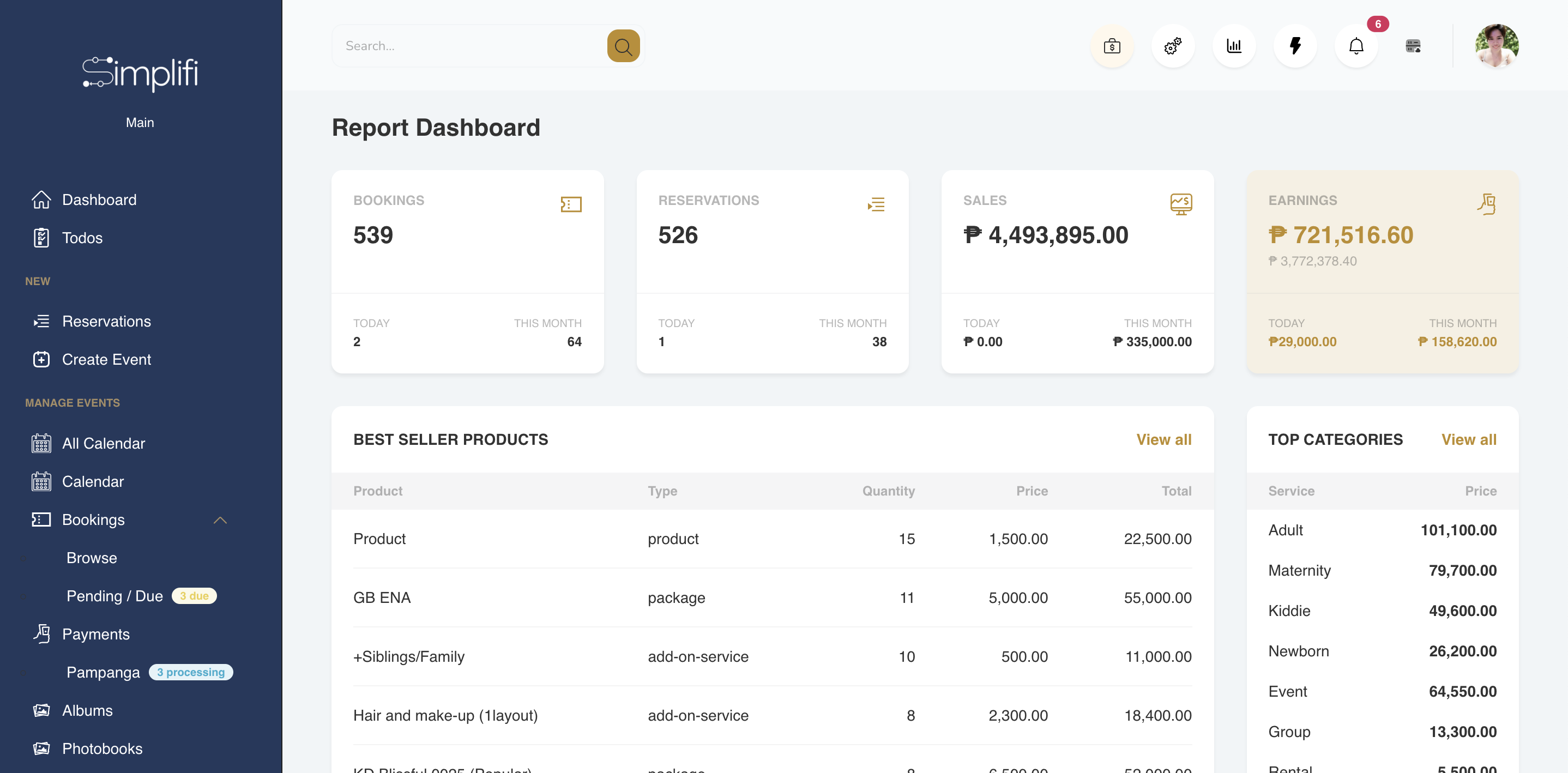
Report Dashboard
The same bookings and payments you already recorded, read back as performance.
Simplifi Studio report dashboard showing bookings, reservations, sales and earnings for the month, enlarged

Bookings

539

Sales

4.49M

Collected

72%

Connected workflow

Every part of your operation, working together

A business rarely moves in isolated steps. An inquiry can become a quote. A quote can become a booking. That booking can move into scheduling, team assignments, service delivery, payment, and completion.

Along the way, the client can stay informed and the activity created by the work can become information for better decisions. Simplifi Studio connects these stages so the context moves with the work.

Automations reminders, notifications, follow-ups and recurring actions — across every stage

What happens in Simplifi

Where it lives

Nothing is re-entered to get here. The previous stage is already on the record when you reach the next one.

Go to that category in the directory →
See how Simplifi works

Hover to pause · click any stage to explore it

By industry

See how Simplifi fits your kind of service business

Every service business has its own way of working. Simplifi gives each business the flexibility to manage the parts of the operation that matter most, while keeping the work connected from booking to completion.

Another kind of service business?

The operation is usually the same shape: inquiries, bookings, a team, clients, payments and reporting.

Talk to us about your workflow →

See what connected operations could look like for your business

Your business has a lot going on between the initial inquiry and the final delivery. Simplifi helps connect those moving parts so you can see what is happening, give your team clearer ownership, keep clients informed, stay on top of payments, reduce repetitive work, and turn daily business activity into useful information.

The next step is seeing how that workflow could fit your business.